You opened Google Analytics to find the words people typed into Google before they arrived on your site, and the report is not there. It is not hidden behind a setting you have missed. Analytics does not hold Google’s search terms. Those words sit in Google Search Console, a separate free tool for the same website, and the only way any of them reach Analytics is a link between the two that carries a copy across.
Analytics does have something called the Search term dimension, and that is the other half of the confusion. It records what people typed into your own website’s search box, not what they typed into Google.
So there are three tools and three jobs. Search Console holds what people asked Google and where you appeared. Analytics holds what those people did once they were on your site. Google Trends is a different instrument again: it shows the direction of interest in a subject, scaled against itself, never a count of searches. The rest of this piece says what each one gives you, what the link between the first two is actually worth, and which questions the three of them together still cannot answer.
Every behaviour described here was checked against Google’s own documentation on 20 September 2026. Google changes these products, so check the linked pages before you act on anything time-sensitive.
Why Analytics has no list of Google’s search terms
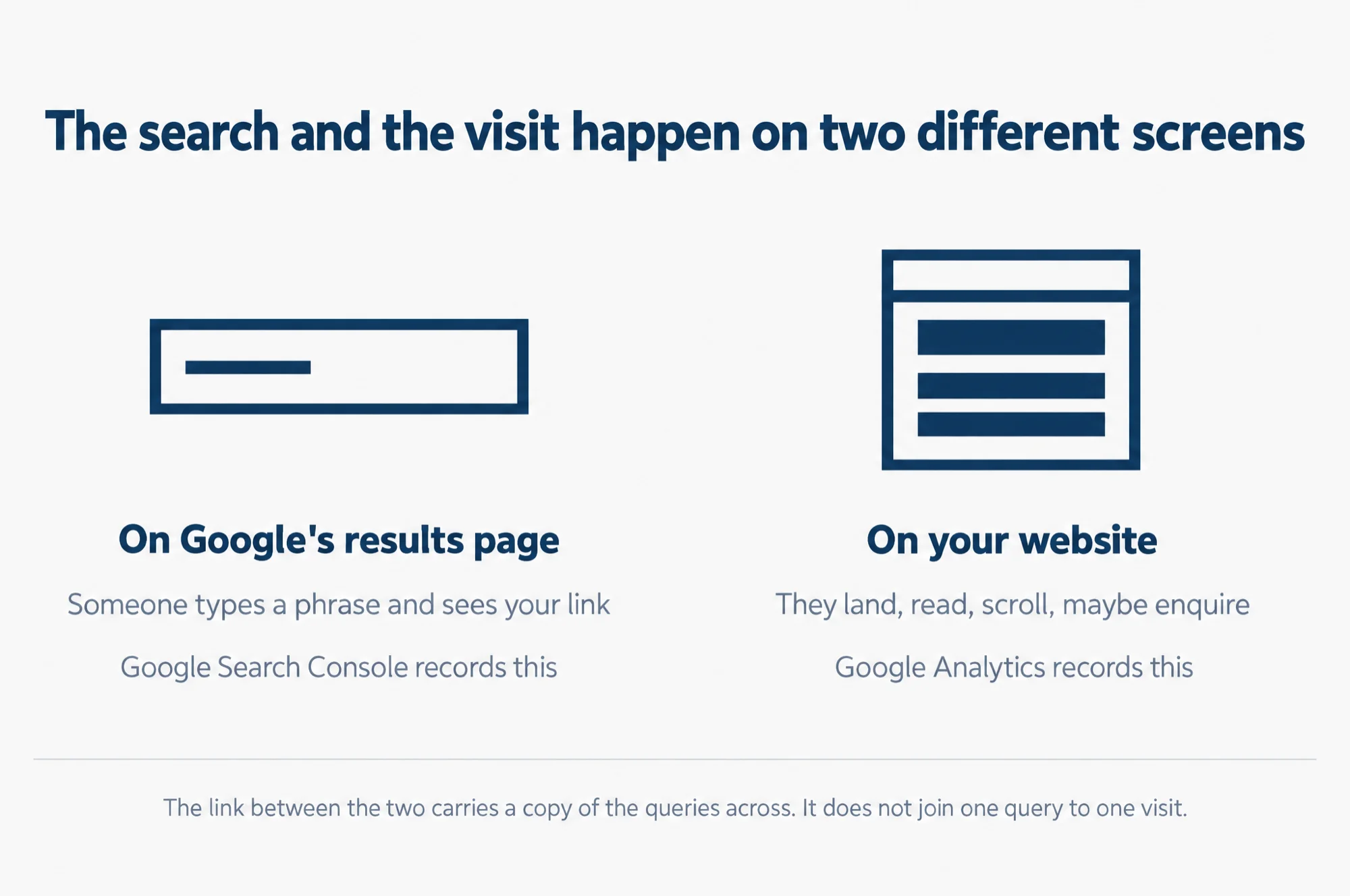
The reason is where the typing happens. The Analytics tag is a piece of code on your pages, and it reports what people do once a page of yours has loaded. Google’s own documentation lists the seven things it can be switched on to see without any code change: page views, scrolls, clicks that lead away from your site, searches made on your own site, video plays, file downloads, and interactions with forms. The search that brought the visitor to you happened one screen earlier, on Google’s results page, where your tag does not run.
Text version
The search and the visit happen on two different screens.
On Google’s results page. Someone types a phrase and sees your link. Google Search Console records this.
On your website. They land, read, scroll, maybe enquire. Google Analytics records this.
The link between the two carries a copy of the queries across. It does not join one query to one visit.
Google’s help page for connecting the two products says the same thing from the other side. The queries it makes available in Analytics come from a linked Search Console property, and it adds plainly that “the data can also be found in the Search Console”. The query data is Search Console’s. Analytics can be shown a copy of it.
The one search terms report Analytics does have
If your website has its own search box, Analytics can tell you what people typed into it, and that is genuinely useful. It is a list of what visitors went looking for, written by the visitors themselves.
Google calls this option site search, and it is part of enhanced measurement, a set of events Analytics collects with no code changes once you switch them on for a web data stream. You need to be an Editor or above on the Analytics account, at the property level, to turn it on. The event is called view_search_results, and Google’s documentation says it fires “each time a user is presented with a search results page, as indicated by the presence of a URL query parameter”. By default it watches for five parameters in the address: q, s, search, query and keyword. The search_term parameter is what fills the Search term dimension you see in reports.
Two practical consequences follow. If your site has no search box, this report stays empty and there is nothing to fix. And if your search box does not put the term into the address bar as one of those five parameters, the event will not recognise it, so the parameter your site actually uses has to be added in the data stream’s advanced settings.
Where Google’s search terms really live: Search Console
Search Console is free, it covers the same website, and its Performance report is the one that holds queries. Four numbers sit against each query. Google defines them as follows: an impression means someone saw a link to your site on Google; a click means someone clicked a link from Google to your site; position is a relative ranking where 1 is the topmost position; and click-through rate is clicks divided by impressions. Position is shown only for Google Search results, and all of it is attributed to the canonical URL, meaning the single address Google treats as the real one when several point at the same page.
Now the part that catches people out: the query list is not complete, and it is not meant to be. Google’s Search Central blog explained this in a post of 19 October 2022. Some queries, which Google calls anonymised queries, are left out of Search Console data to protect the privacy of the person who searched. The test is volume: anonymised queries are “those that aren’t issued by more than a few dozen users over a two-to-three month period”. The actual words are never shown. For a worked case of reading that report, see Search Console performance report: impressions vs clicks.
Those hidden queries are still counted in the chart totals, unless you filter by query. That single fact explains the arithmetic that looks like a broken account. Add up the clicks in the table of queries and you will get a smaller number than the chart above it shows. Nothing is wrong. The difference is the searches too rare to name.
Note what the cut-off counts. It is a number of people, not a share of your traffic. A phrase asked by no more than a few dozen people over two to three months stays out of the table whatever the size of your site. There are also hard limits on how much you can take out: the Search Console interface exports at most 1,000 rows, and the Search Analytics API, which is the programming interface other tools use to pull the same data, goes up to 50,000 rows a day per site per search type.
Linking Search Console to Analytics: what you get, and what you do not
You can link the two, and it is worth doing. Google’s integration page says the link makes two reports available inside your Analytics property. Google Organic Search Queries shows search queries with their Search Console metrics. Google Organic Search Traffic shows landing pages with Search Console and Analytics metrics side by side.
What the link does not give you is the join most people are picturing. Google states the limit in one sentence: Search Console metrics are only compatible with Search Console dimensions and three Analytics ones, which are Landing page, Device and Country. So you can ask which landing page took the clicks, on what kind of device, from which country. You cannot follow a single query through to what that visitor did next, and you cannot slice queries by an audience you built in Analytics. The reports also do not support time-series charts, so the shape over time is still something you read in Search Console itself.
Two more things to expect before you judge the link. Search Console keeps 16 months of data, so the reports in Analytics also show at most 16 months. And the data appears 48 hours after Search Console collects it, so yesterday will look empty.
Google Trends: direction, not counts
Trends is the third tool people reach for when they want to size a market. It cannot do that, and Google’s own FAQ explains why: the numbers are scaled, not counted.
Trends works from a sample of real searches, anonymised, sorted into topics and grouped together. Then it normalises them, which means it makes them comparable rather than absolute. Each data point is divided by the total searches for the place and the period it belongs to, and the result is scaled on a range of 0 to 100 against the topic’s share of all searches. Low-volume terms show as 0, repeated searches by the same person in a short period are stripped out, and Google adds small random noise to protect privacy, which is most visible on terms with little interest. Google’s own summary is blunt: Trends “is not a scientific poll and shouldn’t be confused with polling data”.
Used for what it is, it is a good instrument. Is interest in a phrase rising or falling? Which of two phrasings do people use more? A 0 to 100 line answers both of those honestly, and it also shows when in the year interest appears. We have written up that use in more detail in our guide to using Google Trends for SEO. What you must not do is put a Trends number into a business case as if it were a volume of searches. It is not one.
What the three tools can and cannot answer
Here is the whole map on one screen. The right-hand column is the limit, because the limit is what decides whether a tool can answer your question at all.
| What you want to know | Where it lives | The limit on the answer |
|---|---|---|
| What people typed into Google before they found you | Search Console, Performance report | Queries asked by no more than a few dozen people over two to three months are withheld, and the interface exports 1,000 rows |
| Which of your pages Google sent that click to | Search Console, or the Google Organic Search Traffic report once the two are linked | None worth naming, beyond the withheld queries above |
| What the visitor did after the click | Analytics | It cannot be traced back to the query. Search Console metrics combine only with Landing page, Device and Country |
| What people searched for on your own site | Analytics, Search term dimension from the view_search_results event |
Needs a search box whose term appears in the address as a recognised parameter |
| Whether interest in a subject is rising or falling | Google Trends | Scaled 0 to 100 against place and period, with low-volume terms shown as 0. Never a count |
| How many people in Singapore search a phrase each month | None of the three | Trends publishes no counts, and Search Console only shows queries where your own site already appeared |
What to check first
If you came here to find one report, this is the order we would work in on a client’s account.
- Confirm the site is verified in Search Console. This is where the queries are, and verified ownership is also a condition of linking the two products later.
- Open the Performance report and read the last three months by impressions, not by clicks. Impressions tell you what Google already thinks you are about. Remember that the rows will not add up to the chart total, and that the gap is the withheld queries rather than an error.
- Link Search Console to Analytics if you want the two beside each other. In Analytics, go to Admin, then Product links, then Search Console links. You need the Editor role on the Analytics property and verified ownership of the Search Console property.
- Publish the collection, or you will think the link failed. The Search Console collection of reports is unpublished by default. It sits under Library in the left navigation and you publish it from there.
- Wait 48 hours before judging the data, and switch on site search while you wait if your website has a search box. That is the one search terms list Analytics owns outright.
Questions we get asked
I linked the two products and the reports are not there.
Start here. The Search Console collection is unpublished by default, so nothing appears in the reports navigation until you go to Library and publish it. Check the link itself too: you need the Editor role on the Analytics property, and you must be a verified owner of the Search Console property, which you can complete during the linking process.
Can I link one Search Console property to several Analytics properties?
No. Google’s limits are one to one in both directions: a web data stream can be linked to only one Search Console property, and a Search Console property to only one web data stream. A Google Analytics property can have only one data stream linked to a Search Console property. Also worth knowing before you experiment: links cannot be edited, so a change means deleting the link and creating a new one, and if the new link uses a different web data stream, every date range in the reports will use the new stream.
Our reports start on a date that makes no sense. Why?
Because the start date follows the order you did two things in. If you created the web data stream first and verified the site in Search Console afterwards, data runs from the time of verification. If you verified first and created the stream later, data runs from the date you created the stream. On top of that, Search Console holds 16 months, which is the ceiling on what Analytics can show you.
Is there any way to see a single visitor’s Google search term?
No, and it is worth understanding that this is a design decision rather than a gap. Search Console withholds the rare queries precisely because a query asked by very few people could identify the person who asked it. Trends adds noise for the same reason, to protect privacy. So none of the three tools in this piece will show you one person’s Google search, and that is the design rather than a report you have not found yet.
What to do next
Open Search Console, go to the Performance report, and read three months of queries sorted by impressions. That one screen usually resets the conversation, because it shows the words Google already associates with your site, which are often not the words the business uses about itself. If you want the wider picture of which tools are worth your time after that, read our guide to SEO tools for Singapore SMBs.
Sources
- Google Analytics Help, Connect Search Console to Google Analytics
- Google Analytics Help, Enhanced measurement events
- Google Search Console Help, About Search Console
- Google Search Console Help, What are impressions, position, and clicks?
- Google Search Central, Search Console performance data filtering and limits, 19 October 2022
- Google Trends Help, FAQ about Google Trends data