A website that is down for a few hours, or even a day, rarely loses its Google rankings for good. Google treats that kind of downtime as a temporary problem.
Google’s crawler, the program that visits your pages to read them, slows down and keeps trying. Pages already in Google’s index, the store of pages it can show in search results, stay there for a while.
“For a while” is the catch. Google’s own page on server errors says those pages are kept, but only until they are “eventually dropped.” So the risk grows with time. Several days of downtime, or a site that keeps going down, can start to cost you pages in Google’s results.
Say your shop’s website goes down on a Tuesday morning, and your host fixes it by the evening. The orders you missed are gone. Your rankings very likely are not: next week, your pages should still be where they were in Google.
Does short downtime hurt your Google rankings?
Not for long, in most cases. To see why, it helps to know what Google sees when your site is down.
Every time a browser or a crawler asks for a page, the server first answers with a three-digit status code. 200 means “here it is”. A code starting with 5, written 5xx, means the server failed.
One 5xx code, 503 or “Service Unavailable”, means the server is down for now and expects to be back. During downtime, Googlebot, Google’s crawler, mostly gets 5xx errors, or no answer at all.
Google slows down. Its page on status codes says 5xx errors “prompt Google’s crawlers to temporarily slow down with crawling.”
Google keeps what it has, for a while. The same page says pages already in Google’s index “are preserved in the index, but eventually dropped.” Pages that keep failing are the ones that go. Google’s indexing system, in its own words, “removes from the index URLs that persistently return a server error.”
Google speeds back up when you return. Once your server answers normally again, Google “gradually increases the crawl rate for the site.” The crawl rate is how often Google asks your server for pages.
Google also does not read downtime as a sign of a bad site. Google’s John Mueller made the point in a 2021 Reddit reply, as reported by the SEO news site Search Engine Journal. In his view, a site breaking for a while “is essentially just a technical issue”, and “not something that our algorithms would see as a quality problem.”
How long can a site be down before Google drops its pages?
Google’s current page on server errors gives no number of days. It says “eventually”, and stops there. So be wary of any guide that names an exact day count as if it were Google’s rule.
What Google has said about time is spread over a few places, and the sources are not equal. Two are Google’s own pages on Google Search Central, its site of guides for website owners. One is a reply on Reddit.
| How long | What was said | Where, and when |
|---|---|---|
| 1 to 2 days | Urgent downtime: show an error page with a 503 code | Google Search Central, pause page, updated December 2025 |
| A few days at most | The longest a whole site should be switched off | Google Search Central, pause page, updated December 2025 |
| Up to about a week | How long Googlebot keeps retrying pages that answer 503 | Google Search Central blog, February 2017 |
| A few days | Nothing happens to indexing or ranking before then | John Mueller on Reddit, August 2021, reported by Search Engine Journal |
Google’s pause page is the one to plan by. It is Google’s current guide to taking a site offline. It calls switching off a whole site “an extreme measure that should only be taken for a very short period of time (a few days at most).”
The 2017 blog post gives a retry period, which Google’s current pages on pausing a site and on server errors do not. It says Googlebot “will retry pages that return 503 for up to about a week, before treating it as a permanent error that can result in those pages being dropped from the search results.” The post dates from February 2017. So treat that week as an outer limit, not a target.
Mueller’s Reddit reply adds how the drop happens. Google drops pages one address at a time, as it comes back to each one. It comes back to important pages more often. In his words, Google recrawls most pages, meaning it visits them again, “somewhere in the range of hours to months”.
So a site with long downtime sees its indexed pages fall over the first week or so. The fall then tapers off over the following months.
For a small business site, that adds up to a simple rule, by how long you were down:
- A few hours: nothing to worry about. Run the two checks at the end of this guide, and move on.
- About a day: very likely fine. Run the same checks, then look again a week later.
- More than a few days: every extra day puts more of your pages at risk. Getting the site to answer again comes first. The checks come after.
Will your rankings come back, and how fast?
After downtime of hours or days, they usually come back on their own. Google’s pages on pausing a site and on server errors make no promise about how fast, though. The figure you may have read, “a week or two”, comes from Mueller’s 2021 Reddit reply, not from a Google page.
Here is what that reply said. Asked about a site that had been down for almost five days, Mueller answered: “Sure, that should pop back in a week or two. If it takes longer then the drop wouldn’t be from the downtime.”
He added that pages coming back into the index are “usually back exactly how they were in the past”. Important pages tend to return first, because Google checks them more often. And in the cases he had looked at, coming back “tends to go faster than the dropping out”.
Google’s own pages back up the first step of that. Once your server answers normally, Google raises its crawl rate again, gradually.
Google is much less hopeful about a site that was taken out of its index altogether. Its pause page warns: “There’s no fixed time for a recovery from a complete removal, and there’s no mechanism to speed that up.”
One warning from the same Reddit reply is worth keeping. If your rankings are still down a couple of weeks after the site is back, do not keep waiting. In Mueller’s words, it is “something you need to address, not something to wait out.”
The downtime may simply have come at the same time as something else, such as one of Google’s regular ranking updates. A ranking update is a change to how Google orders its results.
How to plan downtime for a host move or maintenance
Sometimes downtime is planned: a move to a new host, a server upgrade, a rebuild that needs a quiet weekend. You can do this safely, but only if the site tells Google the truth while it is down. That truth is the code 503.
Google’s first advice is to avoid full downtime if you can. If you only need to stop orders for a while, its pause page recommends keeping the site up and switching off the cart instead, with a banner explaining why. That “doesn’t change anything for your site’s visibility in Search.”
When the whole site really must go down, Google’s pause page and its 2017 post on closing for a day set out the steps below.
- Keep it short. Google’s pause page gives 1 to 2 days for urgent downtime with a 503 code, and a few days at most for switching a whole site off.
- Answer every page with a 503 code. It tells Google the site is down for now, for example for maintenance, and expects to be back. Put a short page for visitors behind it, saying when you expect to be back and how to reach you.
- Add a Retry-After time. Retry-After is a line the server sends with the 503 to say how long the downtime should last, as a date or a number of seconds. Google asks for it “with a best effort date or duration”.
- Leave robots.txt working. robots.txt is a small file that tells search engines which parts of your site they may visit. It must keep loading as normal throughout. The next section explains why.
- Check that the 503 is really there. If someone else runs your site, ask them three things before the pause. Does every page answer 503? Is a Retry-After time set? Does robots.txt still load as normal? Google’s pause page shows a one-line check with curl, a command-line tool, for exactly this.
For a host move, Google’s 2017 post adds a way to keep the gap tiny. It works through DNS, the address book that points your domain at a server. Each DNS record has a TTL, which is how long the rest of the internet remembers the old address.
A few days before the move, lower your DNS TTL to a short time, such as 5 minutes. Then point the domain at a temporary server that answers 503 for every page. Move the site, and point the domain at the new server.
Uptime and hosting management are part of what our Website Care plan looks after, if you would rather not handle a move like this yourself.
Why a “back soon” page can do more harm than the downtime
A holding page is the notice visitors see while a site is closed. Some answer with the normal 200 code, the one that means “here it is”. Check yours. To Google, a holding page that answers 200 is now your website.
Google’s 2017 post calls a holding page that covers the whole site an interstitial. With a 503, Google will not index it. “Without the 503 result code, the interstitial would be indexed as your website’s content.”
So your home page, your service pages and your product pages can all be read as one short “back soon” notice.
Google’s current page on status codes adds a second problem. A page that answers 200 but shows an error message appears in Search Console, Google’s free tool for site owners, as a soft 404. That is Google’s name for a page that looks like an error but answers as if all is well.
There is one exception. For downtime longer than a day or two, Google’s pause page recommends the opposite: a real home page that answers 200 and that Google can index, so people can still find you in Search. The 503 is for short stops only.
Keep robots.txt out of the maintenance page
This is the mistake that turns short downtime into a bigger problem. If your maintenance switch answers every address on the site with a 503, robots.txt is one of those addresses, and Google treats that as a reason to stop crawling the whole site.
robots.txt sits at the root of your site, such as yoursite.com/robots.txt. Google asks for it often.
Google’s pause page is blunt. Don’t return a 503 “for the robots.txt file because this blocks all crawling”.
Google’s robots.txt rules spell out what happens next. When the file exists but answers with a server error: “For the first 12 hours, Google stops crawling the site but keeps trying to fetch the robots.txt file.” After that, for the next 30 days, Google falls back on the last good copy it saved, while it keeps trying for a new one. A 503 on the file, Google adds, “results in fairly frequent retrying”.
That stop applies to every page on the site, including any you kept up. So during a maintenance window, the hours the site is closed for work, robots.txt should load exactly as it always does. Before you flip the switch, ask whoever set up the maintenance page to confirm that robots.txt is left out of it.
Read this as words instead
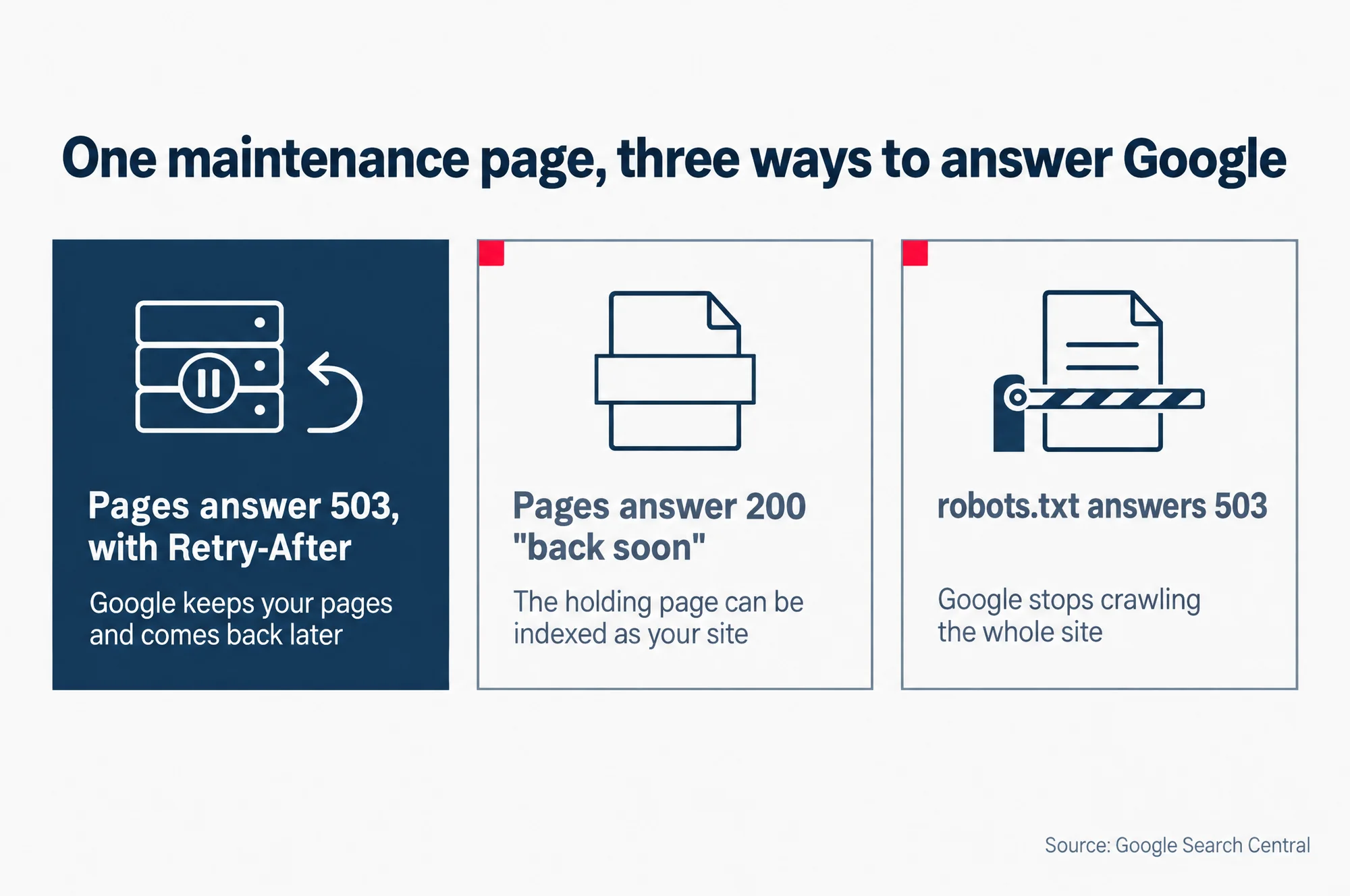
One maintenance page, three ways to answer Google
- Pages answer 503, with Retry-After: Google keeps your pages and comes back later
- Pages answer 200 “back soon”: The holding page can be indexed as your site
- robots.txt answers 503: Google stops crawling the whole site
Source: Google Search Central
What to check in Search Console once the site is back
Two reports in Google Search Console show what Google saw while you were down, and whether it has seen you come back. The checks are the same whether the downtime was planned or not. Both reports are worth a look a day or two after the downtime, and again a week later.
1. The Crawl Stats report. You reach it from Settings, then Crawl stats, not from the main menu. Look first at Host status. It says whether Google could not reach your site at times in the past 90 days, and whether the last time was within the past week or before it.
Click into Host status for three charts. They show whether Google could fetch robots.txt, find your server’s address (DNS resolution) and reach your server (server connectivity). A day that crosses the dotted red line on a chart is a day Google had trouble.
Then look at the Crawl responses table, which sorts Google’s requests by how your server answered. Server errors (5XX), in Google’s words, “cause availability warnings”, and a small chart shows roughly when they happened. You want to see them start with the downtime and stop when it ended.
2. The Page indexing report. Look in the list of reasons why pages are not indexed for one called Server error (5xx). It lists pages that failed when Google asked for them. Once the site is back, open that reason and click Validate fix, which asks Google to check those pages again. Google’s help says validation “typically takes up to about two weeks”.
If both reports look clean, the downtime is behind you. Then the question is whether visitors from search come back too. Our guide to the Search Console performance report shows how to read clicks and average position, your typical place in Google’s results, so you can watch them over the next week or two.