
Managed WordPress hosting puts the machinery around your site on a timer. Updates run by themselves, copies of the site are taken for you, a private test copy is a click or two away, and the server is set up to serve WordPress pages quickly. That is automation. A person who opens the site after an update has run, or who fixes the plugin that stopped your enquiry form sending, is a separate thing, and you should not assume it comes with the plan. On the three Singapore plan pages quoted below, the backups are taken for you, but the test copy arrives as a tool, and so does the one-click restore on HostPapa’s page. Using them is still somebody’s job, and unless you pay someone for it, that somebody is you.
So the extra money is worth paying when you want the server side handled and you have someone, on staff or hired, to do the checking. It is not a maintenance plan. The rest of this page draws the line job by job, so you can hold any host’s feature list up against it.
We read the three hosts’ plan pages quoted here on 30 September 2026. The only host prices on this page are CLDY’s. HostPapa’s page does not say which currency its prices are in, so ask before you compare.
One thing to declare. We sell Website Care, the maintenance plan this page ends on, so read the last section knowing that.
What does a managed plan add over a shared plan?
Mostly automation, on a server set up for WordPress specifically. A shared plan gives your site room on a server it shares with other sites, plus a control panel. You install WordPress, and everything after that is yours to run. Vodien draws the same line on its own page, where it sells “Self-Managed” web hosting and “Managed” WordPress hosting as two separate products.
A managed WordPress plan adds four things on top. All three of the Singapore plan pages quoted here list all four in some form:
- Updates that run on their own, so a new version goes on without anyone logging in to press the button.
- Backups taken for you, automatically, so there is a recent copy of the whole site to go back to.
- A staging site: a private copy of your site where a change can be tried before the public sees it.
- Caching: the server keeps a ready-made copy of each page, so it does not rebuild the page from scratch for every visitor.
That is what the extra money buys, and it is worth having. The trouble is the word “managed”. It sounds like a person looking after your site. On the plan pages it is described as automation, plus a set of tools for the jobs the automation does not do.
WordPress already updates itself. So what is the host adding?
For WordPress itself, less than the plan card suggests. WordPress has been able to update its own core, the main software, in the background since version 3.7. WordPress.org’s own documentation puts it plainly: “By default, automatic updates of WordPress are enabled on most sites.”
Two kinds of core update matter here. A minor release is a maintenance or security fix, and existing sites take those on their own by default. A major release is a new version with new features. Sites first installed on WordPress 5.6 or later take major releases automatically too. Older installs keep taking minor releases only, unless someone switches major ones on.
So when a plan card says “automatic core updates”, it is describing something WordPress already does for most sites, on any host.
Plugins and themes are different. A plugin is an add-on that gives the site a feature, such as an enquiry form, a booking calendar or a shop. A theme sets how the site looks. WordPress does not update these on its own, except in what its documentation calls “special cases, as determined by the WordPress.org API response, which is controlled by the WordPress security team for patching critical vulnerabilities”. In plain words, the WordPress security team can push out an urgent fix when a plugin has a serious hole. Every other plugin and theme update waits for someone to press the button, or to switch automatic updates on.
That is where a host can add something real. It is also where the hosts’ pages say the most different things.
Does a managed host update your plugins and theme?
Some plans say they do. Read the exact words, because the three pages describe three different arrangements.
HostPapa lists it on the plan. Its Managed WordPress page puts “Automated WordPress Plugin & Theme Updates” on the card of its entry plan, MWP Core, and on the three plans above it. Its own FAQ is more careful about how that works. It says core updates, plugin updates, theme updates and security “can be automated by default or in just a few clicks”. So on your plan it may already be on, or it may be a switch you turn on yourself. Ask which.
CLDY gives you a tool. Its WordPress hosting page lists “WordPress Auto-Update” on every plan card. For plugins and themes it describes a WordPress Toolkit, “a feature-rich management interface” that covers “Plugin and theme management” and “Mass automatic and smart updates”. A toolkit is something you, or whoever runs your site, operates.
Vodien names core and security updates. Its WordPress page describes the feature as “automatic core and security patch updates when they become available”, and its plan list shows “WP Auto-updates”. That feature description does not mention plugins or themes by name, so ask whether “security patch updates” covers them, and which ones.
None of this is a criticism of any of the three. An automatic update is a machine pressing the update button on time, and that is worth having. It is a different thing from someone opening the site afterwards to see that the booking form still takes bookings.
One more thing no plan card can promise. Updates to WordPress and to the free plugins in its directory come from WordPress.org, not from your host. On 25 September 2024, WordPress.org published a post saying that WP Engine, a WordPress hosting company it was in a trademark dispute with, “no longer has free access to WordPress.org’s resources”. The same post named update servers and a plugin directory among the things WP Engine would now need to run for itself. Whatever you make of that dispute, it shows that “the host handles updates” rests on a supply line the host does not own.
Backups and staging: a tool you are handed, or a job done for you?
Both. Taking the backups is done for you, on all three plan pages. The staging copy, for testing a change, is a tool you are handed, and so is the one-click restore on HostPapa’s page. That is the line to see clearly before you buy.
Backups are taken for you. CLDY lists “Daily Backup (14 Copies)” on each of its WordPress plans. HostPapa says “We automatically backup your WordPress every night”, keeps those copies offsite, which means away from the server your site runs on, and lists “Backup retention (14 days)” and a “1-click restore”. Vodien offers “automated backups” of your website files and database.
Restoring one is a decision. Somebody has to notice that something is wrong, work out when it started, and pick a copy from before that day. The button does the rest. Fourteen days of copies sounds like plenty until you picture a hacked plugin quietly adding spam links to your pages, and nobody spotting it for three weeks. By then every copy the host still holds has the problem in it.
Staging is a copy, not a test. All three hosts include a staging site. Vodien’s page is the clearest about whose job the testing is: “Staging sites allow you to test the changes you make to your website to ensure they’re error-free before they go live.” The copy comes with the plan. The testing is yours.
When an update breaks the site, who fixes it?
Whoever is paid to look after the site. If that is nobody, it is you.
Picture it. An automatic update runs overnight. A plugin and your theme no longer agree about something, and the enquiry form stops sending. The site still loads, so a check that only asks “is the site up?” says yes. You find out when a customer rings to ask why nobody replied.
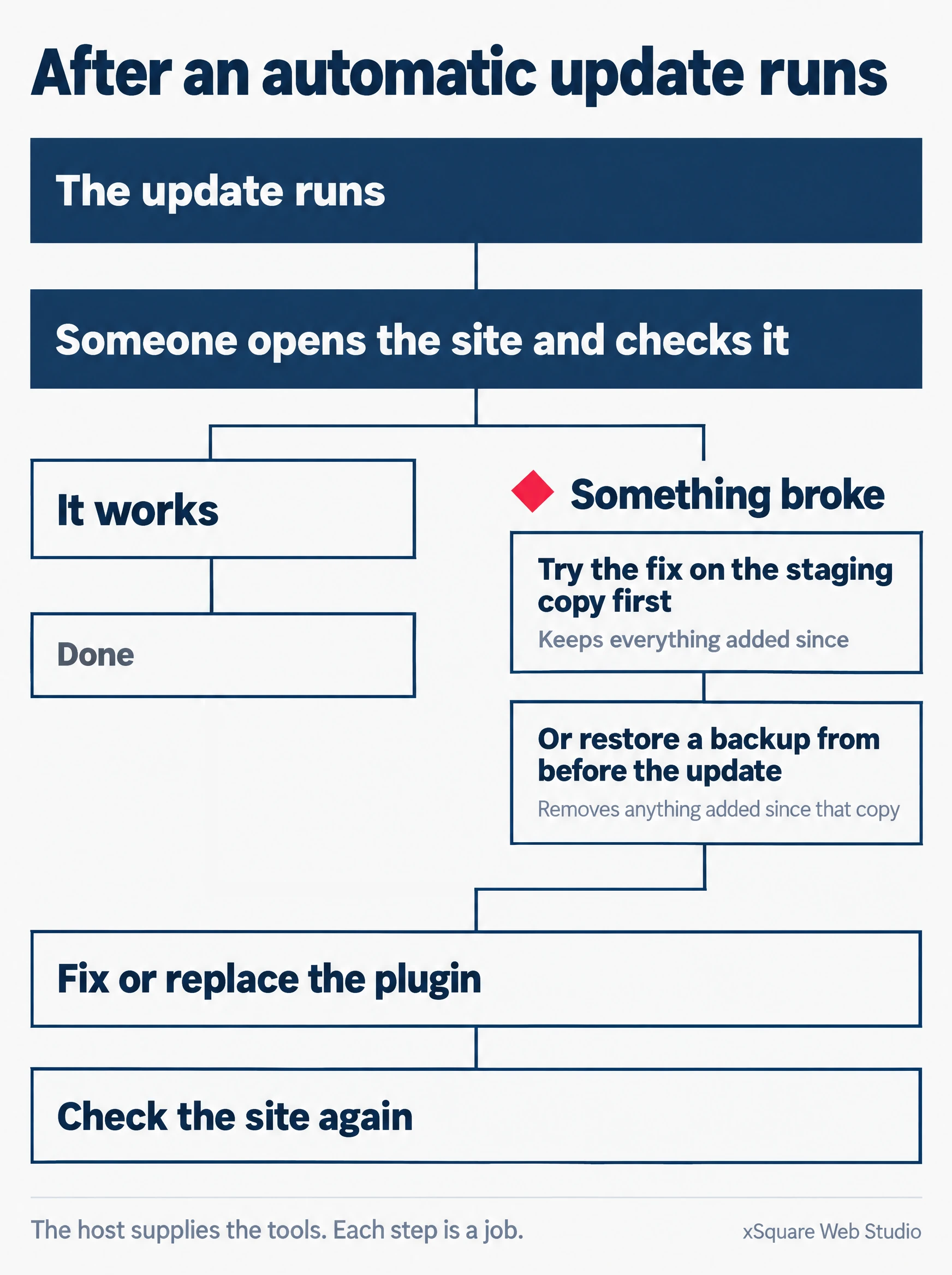
What happens next is worth settling before you buy, because each step is a job:
Read this as a list instead
- The update runs.
- Someone opens the site and checks it.
- It works: done.
- Something broke: try the fix on the staging copy first, which keeps everything added since; or restore a backup from before the update, which removes anything added since that copy.
- Fix or replace the plugin.
- Check the site again.
The host supplies the tools. Each step is a job.
Restoring a backup is the bluntest of those fixes. It puts the whole site back to the day of that copy, so anything added since goes with it: a new page, a changed price, enquiries or orders the site stored in the meantime. Trying the fix on the staging copy first is slower and keeps all of that, and it is also a job someone has to do.
The host gives you the tools for each step: the backup, the restore button, the staging copy. Deciding which step to take, doing it, and checking the result is labour. So ask any host, in writing, what its support team will do on the morning an automatic plugin update breaks a page. The answer tells you exactly where its job ends.
Does a WordPress site need to be hosted in Singapore?
For the law, not as a rule. For speed, it depends on where your visitors are.
The PDPA follows the data. The Personal Data Protection Act, the PDPA, is Singapore’s law on personal data, and an enquiry form that emails you a customer’s name and phone number is handling some. The Personal Data Protection Commission’s guide on sending personal data overseas, published on 14 April 2026, sets out the rule. If you transfer personal data overseas, “be it to a related company, business partner, or vendor”, you “must ensure the recipient protects it to a comparable standard as under Singapore’s Personal Data Protection Act”. The Commission calls this the Transfer Limitation Obligation.
If your host keeps the site’s data outside Singapore, it is one of those vendors. The guide lists four ways to meet the standard: contract terms, certifications the PDPA recognises, the recipient being bound by comparable data protection law, and binding rules inside a group of related companies. So for a host abroad, the question is what its contract and its certifications say, not only where the server sits. Our guide to web hosting in Singapore goes through the regulator’s cloud guidance in more detail. None of this is legal advice.
Speed depends on your visitors. A server in Singapore is close to visitors in Singapore, and distance adds a little time to every request a browser makes. Some plans also put a content delivery network, or CDN, in front of the site. HostPapa describes its CDN as one that “distributes copies of your website globally”, so a visitor is served from a copy near them rather than from the one server. With a CDN in front, where the main server sits matters less for the pages it can copy. The honest test is your own site: open it on a phone from where your customers are, and see how long it takes.
What does managed WordPress hosting cost in Singapore?
The hosting bill is the small number. The work is the big one.
Take CLDY. On 30 September 2026 its WordPress plans started at S$2.99 a month for WP Mini, printed beside the words “Discounted from S$7.19/mo”. WP Pro was S$5.99 a month, discounted from S$14.39. The page says all its prices are in Singapore dollars, and that 9% GST applies to Singapore customers. It does not say how long the discounted price lasts. Until the host tells you in writing, budget for the “discounted from” figure.
Its ordinary cloud web hosting page, on 25 September 2026, started at “S$7.20 /MO”, for a plan that holds five websites and unlimited mailboxes. So at that one host, the WordPress plan’s full price and the ordinary plan’s starting price sat a cent apart. For that money the ordinary plan held five websites and 20 GB of storage. The WordPress plan held one website and 10 GB, and added WordPress Auto-Update, which the ordinary plan’s page does not list.
Read the tier as well as the label. On the same WordPress page, “Always-On Page Caching” appears on the WP Pro and WP Max cards, and not on the WP Mini card.
Now set that against the work. Our own Website Care plan, which does the updating, the daily backups, the scanning and the watching, is S$218 a month per site for a WordPress site that does not sell online, and S$545 for one that does. Both are in Singapore dollars, including GST, on a 12-month term. The hosting bill sits outside that fee.
So the price question that matters is how many hours a month the site needs, and whose hours they are.
Who does what: the host, you, and a care plan
Here is the whole split in one place. The second column is what the three managed plans quoted above list. The third is what is left once they have done it. The last is what our own care plan says it covers, so you can see where one ends and the other begins.
| The job | What the managed plans list | Still yours, unless someone is paid for it | On Website Care |
|---|---|---|---|
| Updating WordPress itself | Automatic core updates, on all three. WordPress also does this by default on most sites. | Checking the site after a major new version goes on | Updated monthly on a schedule. Critical security releases go on as soon as they are out. |
| Updating plugins and the theme | Automated on HostPapa’s plans. A toolkit to run them at CLDY. Core and security patches named at Vodien. | Knowing which updates are switched on, and dealing with one that breaks a page | Plugins updated monthly. Critical fixes straight away. |
| Taking backups | Automatic on all three. Daily, 14 copies, at CLDY. Nightly, kept 14 days, at HostPapa. | Knowing how far back the copies reach | Daily, kept for 30 days |
| Putting a backup back | A one-click restore at HostPapa | Noticing the problem, picking the right day, and accepting what a restore removes | The site can go back to any day in the last month |
| Trying a change before it goes live | A staging copy, on all three | The testing | Not listed on the plan page |
| Watching for trouble | Malware scanning and patching at HostPapa. Security tools on the other two. | Reading the alerts and acting on them | Daily malware scans and continuous uptime monitoring |
| Running the server | The host’s side, on every plan | Whether your plugins and theme still work when the server changes | We run the hosting side. The hosting bill stays separate. |
The third column is the one to take shopping. Put these questions to any host before you pay, and get the answers in writing:
- Which updates run on their own on my plan: WordPress only, or plugins and the theme too? Are they on from the start, or do I switch them on?
- How many days back do your backups reach, and where are the copies kept?
- When I need a restore, do I press the button, or will your support team do it for me?
- If an automatic update breaks a page, what will your support team fix, and what will they leave to me?
- Where are your servers, and what does your contract say about protecting personal data?
- What will I pay once the discounted price ends, and when does it end?
Questions we get asked
Is managed WordPress hosting the same thing as website maintenance?
No. Hosting is the place the site lives, and a managed plan automates some of the upkeep of that place. Maintenance is ongoing work done on the site itself, by a person, on a schedule. One company can sell both and bill them separately, as we do, which is why they get confused. Our guide to what a website maintenance service covers sets out what a care plan should include and the questions to hold any provider to.
Will a managed host move my existing WordPress site over?
All three offer to, in different ways. CLDY lists “Free Website Migration from your existing WordPress hosting”. HostPapa lists “Unlimited & Free full-service WordPress migration”, which describes a service. Vodien offers an “Automated Migration tool” that moves the site “with just a few clicks”, which describes a tool you run. That is the same line this whole page is about, so ask which kind you are getting. Whichever it is, keep your old hosting running until the new copy has been checked page by page.
Does the PHP version on my hosting matter?
Yes, and it is a good example of where the host’s job ends. WordPress runs on PHP, the programming language its code is written in, and WordPress.org recommends PHP version 8.3 or greater. Each PHP version gets security fixes for a fixed time. PHP’s own site gives version 8.2 security support until 31 December 2026, after which it gets none. Keeping the server on a supported version is the host’s side. Whether your plugins and theme still work on the newer version is a question about your site, and only someone who opens your site can answer it.
Where Website Care begins
Website Care starts in the third column of that table. It is our paid answer to “whose job is it?”, for WordPress sites only.
The last column of that table is what the plan covers. The line we would point to first is the watching: we monitor the site continuously, so if it goes down we hear it from the monitor, not from you.
It does not replace a good host. It sits on top of one, and if your host already does part of this, you should not pay for it twice.
So the next step is a short conversation. Send us the site’s address from the Website Care page, or book a short call if you would rather talk it through. We look at where the site is hosted now and what that host already does. Then we tell you which jobs the plan would take on, which price applies, and whether it earns its fee for the site you have. If it does not, we will say that too.