If you have found a pile of spam backlinks pointing at your site, the usual answer is to leave them alone. Google’s help page for its disavow tool says so in plain words: “In most cases, Google can assess which links to trust without additional guidance, so most sites will not need to use this tool.” The disavow tool is how you tell Google which links to your site you do not stand behind.
You may have spotted them in Google Search Console, Google’s own free tool for site owners. Or an SEO tool flagged them. SEO is short for search engine optimisation, the work of getting a site found in search.
The worry is a penalty. The penalty you can actually see is called a manual action: a decision by a person at Google that your site breaks a spam rule. Google tells you about it in your Search Console.
When Google gives an example of incoming links that can count against a site, its example is not strangers’ links. It is links “you or an SEO that you’ve hired may have built”, where an SEO means a person or firm doing that work for you. Who built the links is also the question to ask about any backlink package you are being offered, so this guide ends there.
- Backlink
- A link on another site’s page that points to a page on your site. Google’s Links report in Search Console lists the ones it has found.
- Link spam
- Google’s name for links made to game its rankings. Google’s spam policies, its published rules against spam in search, define it as “the practice of creating links to or from a site primarily for the purpose of manipulating search rankings”. “Spam backlinks” is the same thing seen from the site that receives them. This guide uses Google’s name, link spam, for both.
- Disavow file
- A plain text file you upload to Google’s disavow links tool. It lists the pages or whole domains linking to your site that you want to disavow, which means telling Google you do not stand behind those links.
What Google does with links you did not build
Mostly, nothing you will ever see. The disavow help page has a line written for exactly this worry: “Google works very hard to make sure that actions on third-party sites do not negatively affect a website.” A link that someone else put on their own site is an action on a third-party site.
Google’s automated systems that detect search spam are, in its words, “constantly operating”. Google names one of them, SpamBrain, as its “AI-based spam-prevention system”, where AI means artificial intelligence. You do not switch these on or feed them a list. They run whether or not you ever open the disavow tool.
Google does not say never, though. The next sentence on the disavow page is this: “In some circumstances, incoming links can affect Google’s opinion of a page or site.” Then it gives its example, and the example is about who built the links. It describes links that “you or an SEO that you’ve hired may have built” through “paid links or other link schemes”.
So the link spam to look at first is the kind someone built for your site, by payment or by a scheme. A list of links from strangers is not the case Google’s example describes.
Google’s Links report help is a little looser. If you see “unknown and possibly spammy sites” there, it says “you might need to ask to be removed or, if all else fails, disavow them”. Notice the order: ask for removal first, and disavow only when all else fails. The page that says whether you need the tool at all is the disavow help, and its first step is one Google calls “Decide if this is necessary”. Two sections down, that step gets its own answer.
The rules behind all of this are Google’s spam policies, which sit in the free documentation Google publishes for site owners. Our guide to Google’s own SEO documentation shows where they sit and how they differ from Google’s advice pages. Google last updated the spam policies page on 28 August 2026, and the rules quoted in this guide are from that version.
“Toxic” is a tool’s word, not Google’s
If the alarm came from an SEO tool that marked some of your links “toxic”, that label belongs to the tool. Not one of the Google pages quoted in this guide uses the word, including the spam policies, the disavow help, the Manual actions help and the Links report help.
The disavow help gives no score either. Its test, in the next section, is two conditions, and neither of them is a number.
A tool’s list is still useful as a list. It shows you who links to you. What it cannot tell you is whether Google has acted against your site. Google says it tells you that itself, “in the Manual actions report and in the Search Console message center”.
So treat a “toxic” score as a reason to look, not a reason to disavow. The check that counts is Google’s own, and it is free.
When a disavow file is worth making
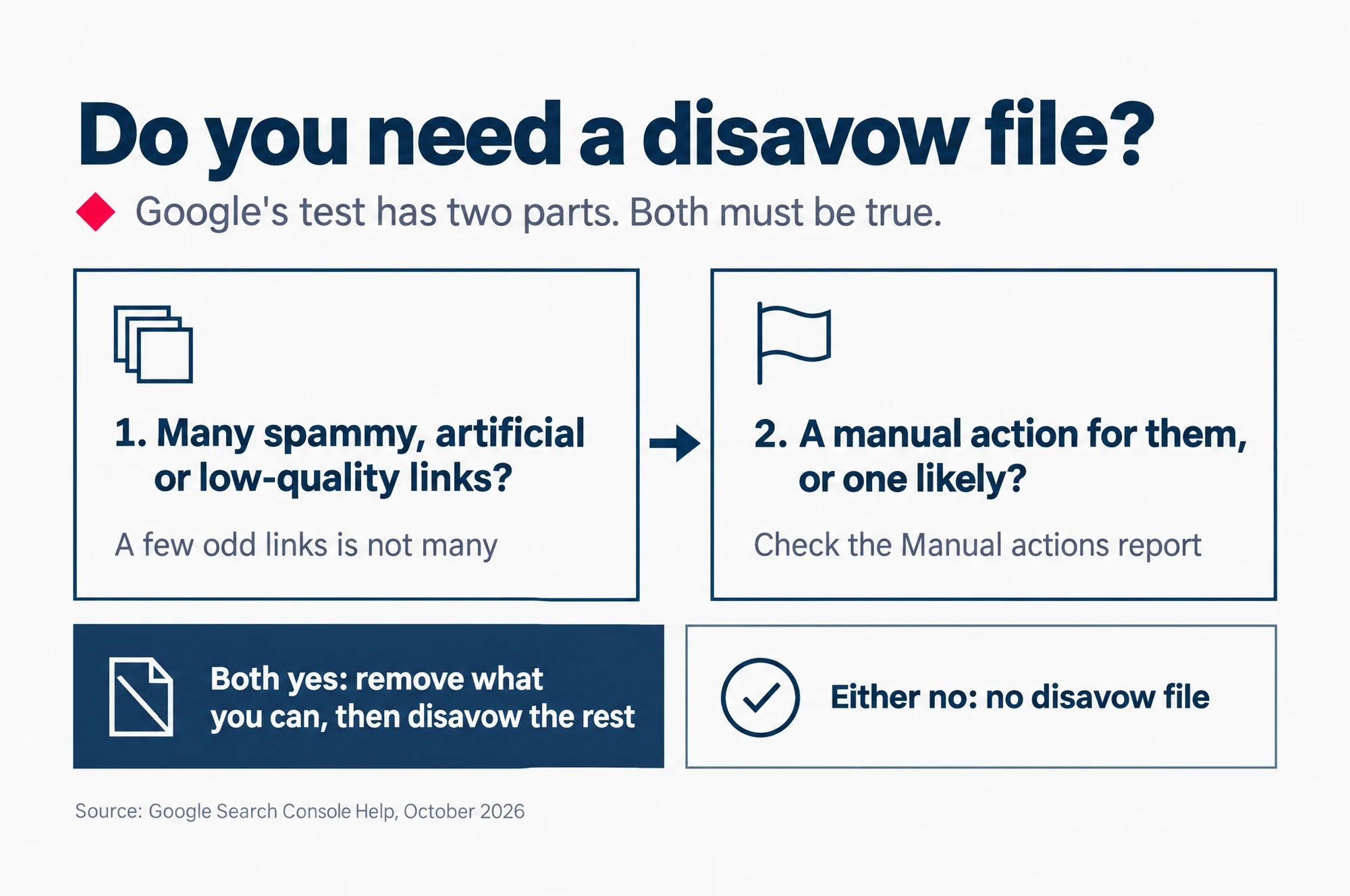
Only when two things are true at the same time. Google’s disavow page says to disavow backlinks “only if” both of these hold, and it joins them with a capital AND:
- “You have a considerable number of spammy, artificial, or low-quality links pointing to your site”
- “The links have caused a manual action, or likely will cause a manual action, on your site.”
The first condition is about volume. A few odd links in a report is not “a considerable number”.
The second is the one you can answer in a minute. A manual action for links has its own name in the Manual actions report, “Unnatural links to your site”. Google describes it as “a pattern of unnatural, artificial, deceptive, or manipulative links pointing to your site”.
The “likely will” half covers something the report cannot show yet. Say an SEO seller you used two years ago bought links for your site, and you have only now found out. That is the case Google’s own example describes, and it is the one time a clean report does not settle the question by itself.
Unless both are true for your site, leave the tool alone. Google calls it “an advanced feature” that “should only be used with caution”, and gives the reason in the next breath: “If used incorrectly, this feature can potentially harm your site’s performance in Google Search results.”
Read this as words instead
Do you need a disavow file?
Google’s test has two parts. Both must be true.
- Many spammy, artificial or low-quality links? A few odd links is not many.
- A manual action for them, or one likely? Check the Manual actions report.
Both yes: remove what you can, then disavow the rest.
Either no: no disavow file.
Source: Google Search Console Help, October 2026
If you are in the narrow case
One thing to check before you start. Search Console sets up a site in one of two ways. A Domain property covers your domain and all its subdomains in one, a subdomain being an address such as shop.example.com. A URL-prefix property covers only the addresses that begin with one exact start, such as https://www.example.com/. Google’s disavow page says the tool “does not support Domain properties”, so it works with the URL-prefix kind.
- Download your links from Search Console. Google gives two ways: by site, from Top linking sites then Export, or by date, from the Links report, then Export external links, then Latest links.
- Mark the links that break the link spam policy. If the list is long, Google suggests starting with “the sites that link to you the most, or links that were created recently (in the last few months)”.
- Ask for removal first. Write to the owner of each site and ask them to remove the link, or to add rel=”nofollow” to it, a label that stops the link passing ranking credit, the help a link can give your place in Google’s results. Google is plain that a disavow file is no substitute for asking: “Blindly adding all backlinks to the disavow file is not considered a good-faith effort”.
- List only the links you could not get removed, in a plain .txt file saved as UTF-8, a standard way of storing text, one page or domain to a line. Put domain: in front of a whole domain, as in domain:example.com. Keep out the ordinary links other sites gave you on their own: “Make sure that you don’t disavow organic links to your site.”
- Upload the file in the disavow links tool. You get one list per property, and a new upload replaces the old list.
- If you have a manual action, select Request Review in the Manual actions report. Include the links you had removed and say why you could not remove the rest. Google warns that link-related reviews “may take longer than usual”.
How to read a backlink package before you pay
Hold the offer up against one rule. The first item on Google’s list of link spam is “Buying or selling links for ranking purposes”, and the first example under it is “Exchanging money for links, or posts that contain links”.
Paid links are not banned outright. Google says buying and selling links “is a normal part of the economy of the web for advertising and sponsorship purposes”. Such links are fine, it says, “as long as they are qualified with a rel=”nofollow” or rel=”sponsored” attribute value”.
Those two are small labels inside a link’s code. Google asks sites to mark “advertisements or paid placements (commonly called paid links)” with rel=”sponsored”. It still accepts rel=”nofollow” on paid links, “though sponsored is preferred”.
So put one question to the seller: will every link carry rel=”sponsored” or rel=”nofollow”?
If the answer is yes, the links follow the rule. Then ask what the package expects those links to do for your rankings, because Google’s help describes these labels as a way to “prevent them from passing PageRank”, which is the ranking credit a link carries. If the answer is no, the links are link spam by Google’s own list.
The rest of the offer is worth reading line by line. Each row below pairs something a package might include with the example on Google’s link spam list that it matches.
| If the package includes | Google’s link spam list names |
|---|---|
| Paid guest posts or press releases with links that pass ranking credit, or with your keywords as the link text | “Advertorials or native advertising where payment is received for articles that include links that pass ranking credit, or links with optimized anchor text in articles, guest posts, or press releases distributed on other sites” |
| Directory or bookmark submissions in bulk | “Low-quality directory or bookmark site links” |
| Links made by software or an automated link service | “Using automated programs or services to create links to your site” |
| A link swap or partner network | “Excessive link exchanges (“Link to me and I’ll link to you”) or partner pages exclusively for the sake of cross-linking” |
| Footer or sidebar links across many sites | “Widely distributed links in the footers or templates of various sites” |
| Forum or blog comment links | “Forum comments with optimized links in the post or signature” |
The cost does not end at the invoice. Google’s Manual actions help says buying links or joining link schemes “can result in some or all of your site getting a manual action”.
A link spam update can cost you too. Google calls it a spam update when it makes a notable improvement to its spam systems, and a link spam update is one that deals specifically with link spam. When such an update removes the effect of link spam, Google’s spam updates page says “any ranking benefit the links may have previously generated for your site is lost”. That benefit, it adds, “cannot be regained”.
For what it is worth, we do not sell link building, the work of getting other sites to link to yours. Our SEO service page says so in its own questions: it is not part of our SEO service, and we do not sell it on its own.
Why does my Links report suddenly show so many strange sites?
The report is a long memory, not a live count. Google’s help says it “includes links that Google has found over time”, and that “These links may have since been removed, or a page may no longer exist.” It also “doesn’t specify if a link is marked as nofollow”. So a long list of odd domains tells you who has linked to you at some point. It does not tell you that Google holds any of them against you.
If I disavow links, do they disappear from the Links report?
No. Google’s disavow page says “Disavowed links will continue to be shown in the Links report.” Seeing them there after you upload a file does not mean the file failed.
How long does a disavow file take to work?
Google gives weeks, not days. Once the upload succeeds, “it can take a few weeks for Google to incorporate your list into the index as Google recrawls the web”. In plain words, your list takes effect as Google visits pages across the web again.
Can I undo a disavow file?
Yes. In the disavow links tool, select the property and click Cancel Disavowals to remove the whole list. To change it instead, upload a new list, which replaces the old one. Either change also takes a few weeks to show, by Google’s account.
Check this today, then read on
Open Search Console and go to the Manual actions report. If your site has no manual actions, Google says “you’ll see a green check mark and an appropriate message”.
With that check mark, and no links you know were bought for your site, Google’s second condition is not met. Its test needs both, so there is no disavow file to make, whatever a tool’s list says.
Then read our guide to Google spam updates and how to tell if your site was hit. It covers the other half of the penalty question: how to tell a drop during an update apart from a manual action, using three free Google reports.