Yes, speed plays a part in where your pages rank on Google, but a smaller and plainer part than a speed-fix sales pitch suggests. Google says it uses Core Web Vitals in ranking. These are its three measures of how a page feels to real visitors: how fast the main content appears, how quickly the page responds to a tap or a click, and how still it stays while it loads.
Google also says two things the pitch tends to leave out. A good result does not guarantee a top place. And Google will still show the most relevant page even when that page is slow.
Google Search always seeks to show the most relevant content, even if the page experience is sub-par.
So relevance comes first, and speed is one signal among many. Google’s pages on page experience and Core Web Vitals put no figure on how much speed counts. Be wary of anyone who does.
If someone has told you a slow site is why you rank low, ask them one question: which of the three measures fails for real visitors, and on which pages? You can answer it yourself, free, with two Google tools, Search Console and PageSpeed Insights.
What does Google say speed does to rankings?
It counts, and Google says so in one line. Its page on page experience asks which parts of page experience are used in ranking, and answers: “Core Web Vitals are used by our ranking systems.” It recommends that site owners get good Core Web Vitals “for success with Search and to ensure a great user experience generally.”
Core Web Vitals are three measurements, each with a limit Google calls good:
- Largest Contentful Paint (LCP)
- How long the main content of the page takes to appear. Good is 2.5 seconds or less.
- Interaction to Next Paint (INP)
- How quickly the page reacts when someone taps or clicks something on it. Good is 200 milliseconds or less, which is a fifth of a second.
- Cumulative Layout Shift (CLS)
- How much the page jumps about unexpectedly while it loads, such as a button sliding down just as you go to tap it. Good is 0.1 or less. It is a score, not a time.
Google does not judge these on your best visit or your average one. It uses the 75th percentile. Line up every visit to a page from best to worst, and it is the visit three quarters of the way along. In practice, a page is good on a measure when at least three in four visits meet the limit.
Page experience is the wider name. Google uses it for the whole feel of a page. Besides Core Web Vitals, its own checklist asks whether the page is served securely (over HTTPS, the padlock in the browser), works well on a phone, keeps ads from crowding the content, and avoids intrusive interstitials, the pop-ups that cover the page before you can read it.
Only one item on that list is a direct ranking help, and Google says which: “Beyond Core Web Vitals, other page experience aspects don’t directly help your website rank higher in search results.” It still advises working on the rest, because they make a site “more satisfying to use”.
There is no single speed switch either. Google’s answer to whether it uses one page experience signal is “There is no single signal.” Its core ranking systems “look at a variety of signals that align with overall page experience.” And they mostly judge a page on its own, though Google adds that it does “have some site-wide assessments”.
Google’s Search Central channel has also taken up page speed on video, in an episode called Page Speed: SEO Mythbusting, posted in July 2020 and about 15 minutes long.

Watch on YouTube: Page Speed: SEO Mythbusting, by Google Search Central.
We chose it because it is Google’s own channel on this exact question. It dates from 2020, so where its details differ from the limits above, go by the limits above: they come from Google’s current pages.
Both pages sit in Google’s Search Central documentation. If you want Google’s own word on the rest of SEO, our guide to Google’s official SEO documentation shows where to find it.
Why relevance still comes first
Because Google puts it first, in the sentence quoted at the top. The lines that follow it say when speed starts to matter: “But for many queries, there is lots of helpful content available. Having a great page experience can contribute to success in Search, in such cases.”
When your page is the best answer. Say a homeowner searches for a problem that only your page explains properly. By Google’s own wording, it can still show your page, slow or not.
When many pages answer equally well. Say ten aircon servicing firms all have a clear, useful page for the same search. That is the case Google describes, where a great page experience “can contribute to success”. Speed can help you there.
If the pages above yours answer the search better, start with your answer, not your speed.
Working out which searches each page should answer, and making sure it answers them, is most of the work in a full SEO plan. Our SEO service covers both halves: the technical groundwork, and the keyword and content work that decides whether a page is the relevant one.
Which speed numbers should you read first?
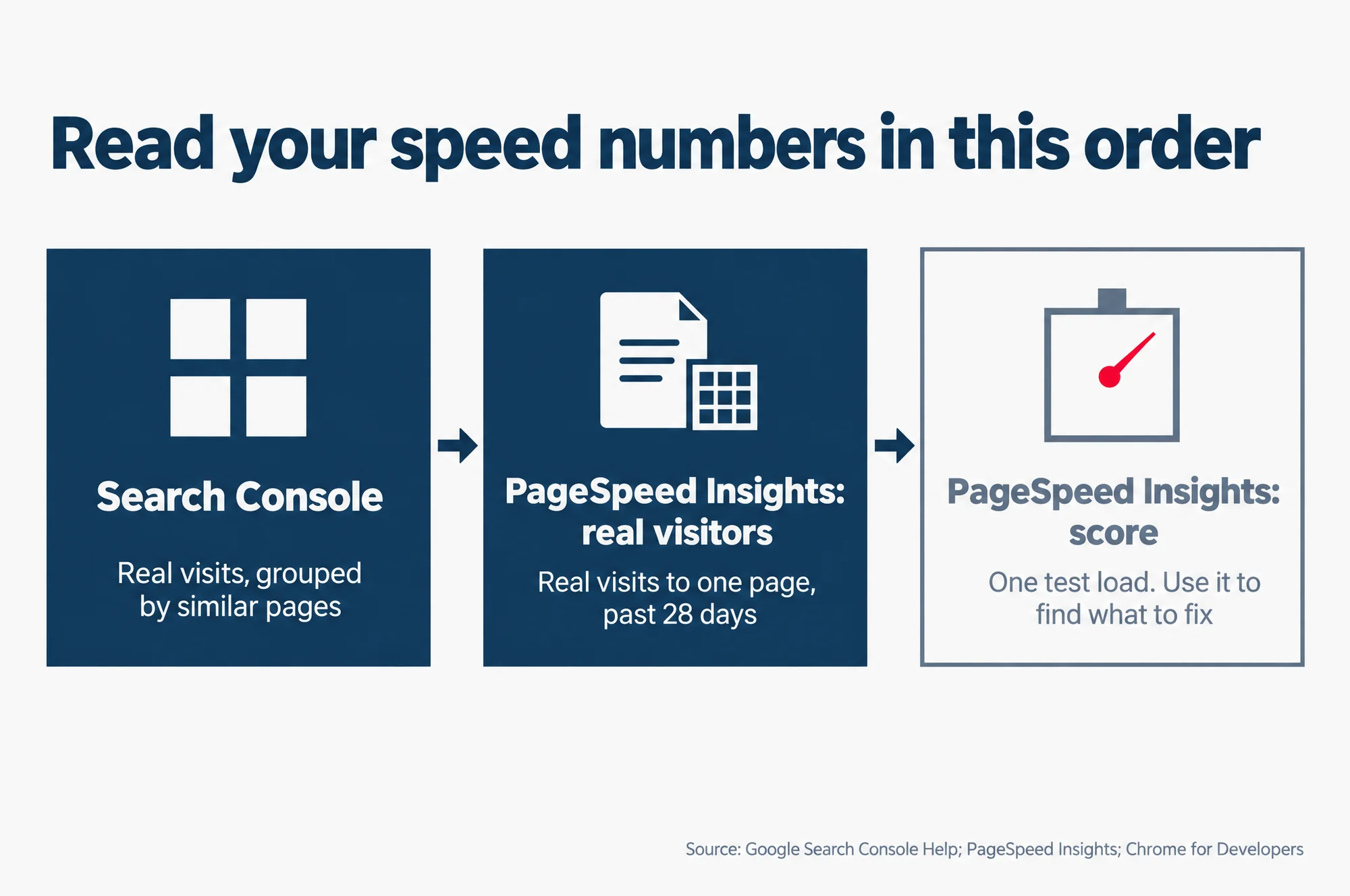
Read the real-visitor numbers first and the score last. They are two different kinds of measurement, and only one of them is a record of what your visitors got.
Real-visitor results are what Google calls field data. They come from real visits to your pages, on visitors’ own devices and connections. Google keeps them in a dataset called the Chrome User Experience Report, or CrUX, and both Search Console and PageSpeed Insights read from it.
The score, the performance number that turns green at 90, is lab data. It comes from Lighthouse, a test tool from Chrome that loads your page in a simulated setting. Google’s help says lab data is useful for finding problems, because it is measured in a controlled way, but that it “may not capture real-world bottlenecks.”
The real-visitor data is also the one Chrome’s documentation ties to ranking. It says Search Console “shows how CrUX data influences the page experience ranking factor by URL and URL group.”
1. Search Console’s Core Web Vitals report. It sorts your pages into Poor, Need improvement and Good, for each of the three measures, with mobile and desktop shown apart. It puts similar pages into groups, and a group takes the status of its worst measure. Google’s own example: a group with poor CLS but good INP shows as poor. Start with any group marked Poor.
2. The real-visitor section of PageSpeed Insights. Enter one page address, such as your main service page. PageSpeed Insights shows that page’s real-visitor results over the previous 28 days, and whether it passes the Core Web Vitals assessment. A page passes when all three measures are Good at the 75th percentile.
3. The score, last. Read the score and the suggestions that come with it. They tell whoever fixes the site where to look.
Read this as words instead
Read your speed numbers in this order
- Search Console: Real visits, grouped by similar pages
- PageSpeed Insights: real visitors: Real visits to one page, past 28 days
- PageSpeed Insights: score: One test load. Use it to find what to fix
Source: Google Search Console Help; PageSpeed Insights; Chrome for Developers
Why do PageSpeed Insights and Search Console show different numbers?
Because they are often not measuring the same thing. Google’s help pages point to three differences.
| Search Console report | PageSpeed Insights, real visitors | PageSpeed Insights score | |
|---|---|---|---|
| Measured from | Real visits | Real visits | One simulated page load |
| Covers | Groups of similar pages | One page, or the whole site when the page has too few visits | One page |
| Time covered | 28-day average, updated daily, with three months of history | 28-day average, updated daily, no history | The moment you run the test |
| Best for | Finding which kinds of page are slow | Checking one page that matters | Finding what to fix |
The score is a test, not your visitors. PageSpeed Insights’ help answers this exact question. Real-visitor data comes from “users in the real-world on a variety of devices and network conditions”, while lab data is “based on a simulated load of a page on a single device and fixed set of network conditions. As a result, the values may differ.” The score can even change between two runs when nothing on the page has changed, for reasons such as how busy the network or the testing machine is at that moment.
Search Console looks at groups, PageSpeed Insights at one page. Say your blog posts all share one slow layout. Search Console may flag that whole group as poor, while your home page tests well on its own.
A small site’s page may borrow the whole site’s numbers. When a page has too few visits for a result of its own, PageSpeed Insights shows the result for all the pages of the site together. If the whole site has too few visits, there is no real-visitor result at all, and Search Console’s report shows “No data available”. That is normal for a small business site.
What PageSpeed Insights score do you need for SEO?
None that Google names. Its pages on page experience and Core Web Vitals talk about the three measures from real visits, and set no target for the PageSpeed Insights score.
PageSpeed Insights’ own help rates any green score, 90 and above, as good. In the same sentence it adds the catch: good lab data “does not necessarily mean real-user experiences will also be good.”
Google also warns against chasing the number. Its page experience page says the scores are meant to help you improve your site for your users overall, and that “trying to get a perfect score just for SEO reasons may not be the best use of your time.”
Our advice: if the real-visitor results pass, treat a score below the green band as a list of jobs, not an emergency.
When is a slow site still worth fixing?
When real people are having a slow time on the pages that bring you business. That is worth fixing whatever it does to your ranking, because those visitors are why the site exists.
There is no safe wait, either. Google’s web.dev guide on how the limits were set says Chrome’s data shows “there is not a single amount of time users wait for a web page to display content before aborting the page load.” Some visitors give up sooner than others, and the longer the wait, the more of them leave before they see anything.
Here is how we would read your own results:
Your real-visitor results say Poor or Need improvement on pages that bring enquiries
Worth fixing, for the visitors. Ask whoever does the work which measure fails and what the fix changes for it. Search Console’s report averages the past 28 days, so give a fix about four weeks to show there.
Your real-visitor results pass, but the score is not green
Not urgent. Pick the cheap suggestions from the score’s list and leave the rest. Do not pay for a perfect score.
There are no real-visitor results for your site
Your site has too few visits for Google to measure yet. Use the score’s suggestions to catch anything badly wrong, and look again in a month or two.
The same web.dev guide says many sites “would benefit from optimizing even beyond” the good limits, and should tie that work to their own business numbers. For a small business, that comes down to one question: would a faster page bring more enquiries, calls or sales from the people who already find it? If you cannot see how it would, the money is better spent on the pages themselves.
And if someone is selling you a speed fix as a ranking cure, ask them three things:
- Which of the three measures fails, in the real-visitor results and not the score?
- On which pages, or which Search Console group?
- What will visitors notice once it is fixed?
A seller who can answer those has looked at your visitors. One who only quotes the score has looked at a test.
Check speed in its proper place
Speed is the third check, not the first. Our guide on how to check your website’s SEO for free takes you through it in the right order: whether Google has indexed your pages, then which searches you show up for, then PageSpeed Insights, real-visitor results first. If indexing or relevance is the problem, it will show up before speed does.