To create a website in Singapore, work through five steps in this order. Each step has one thing to get right.
- The domain. Register your web address with your business as the holder. If it ends in .sg, verify it within 21 days with Singpass or Corppass, the government logins.
- The words and pictures. Decide what each page must say, gather your photos, and write the privacy notice for any form.
- Web design. Decide who plans and builds the pages: you on a do-it-yourself website builder, a freelancer or a studio. Choose by what the site has to do.
- Hosting. Put the finished site on hosting, the rented space that shows it to visitors. Keep the account in your business’s name, with your own login.
- Care. Keep the site updated, backed up and its form tested, from launch day on.
Two of those steps carry Singapore rules that catch first-timers. A new .sg domain is suspended if nobody verifies it in time. And a contact form brings in the PDPA, Singapore’s personal data law, before the first message arrives.
This guide is for the owner of a small Singapore business with no web person on staff. For each step it says what you do, what the person doing your web design does, and what it costs. We are a Singapore web design studio, so the prices here are our own published ones.
Read this as words instead
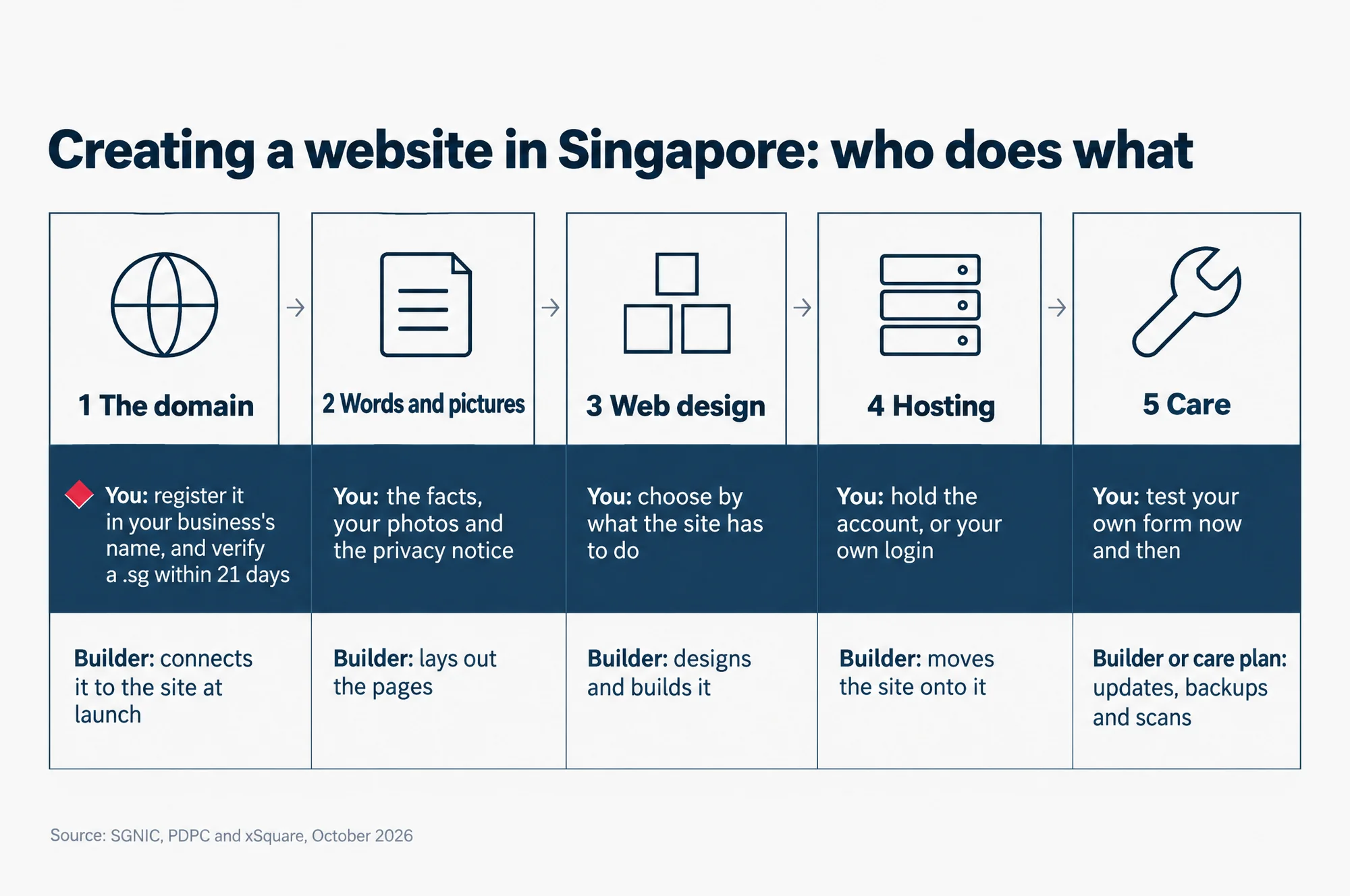
Creating a website in Singapore: who does what
- The domain. You: register it in your business’s name, and verify a .sg within 21 days. Builder: connects it to the site at launch.
- Words and pictures. You: the facts, your photos and the privacy notice. Builder: lays out the pages.
- Web design. You: choose by what the site has to do. Builder: designs and builds it.
- Hosting. You: hold the account, or your own login. Builder: moves the site onto it.
- Care. You: test your own form now and then. Builder or care plan: updates, backups and scans.
Source: SGNIC, PDPC and xSquare, October 2026
Step 1: the domain, in your business’s name
The domain is your website’s address, such as yourbusiness.com.sg. It comes first because everything else hangs off it: the site, and usually your business email too. Register it so that your business is the holder on record, not the person or firm helping you.
Do you need a .sg or a .com.sg name? No. A website works on any of the usual three: .sg, .com.sg or .com. The difference is what each one asks of you. SGNIC, the Singapore Network Information Centre, sets the rules for names that end in .sg.
- .sg asks for a Singapore address. SGNIC’s guide to choosing a .sg extension says it “is available to all with a valid Singapore postal address”.
- .com.sg is for businesses. SGNIC says applicants must be registered, or in the middle of registering, with ACRA or one of the other bodies it lists. ACRA is the Accounting and Corporate Regulatory Authority, where Singapore businesses are registered.
- .com is not a Singapore name, so SGNIC’s rules do not apply to it.
To compare the .sg names in more detail, see our guide to .sg domains and hosting for Singapore businesses.
A new .sg name must then be verified within 21 days. SGNIC’s VerifiedID@SG rules say every new .sg name needs to be checked with Singpass or Corppass, the government logins for people and for businesses. The check is due 21 calendar days after you register. If it is not done, SGNIC suspends the name, and in its words, “its website and emails will cease to function”.
The check itself is quick: SGNIC says it should take less than five minutes. What trips people up is who has to do it. It is the domain’s administrative contact: the contact person named when the domain is registered. SGNIC asks for one of two kinds of contact. One is a person with a valid Singapore NRIC or FIN, the identity numbers on a Singapore identity card or a foreigner’s pass. The other is an organisation with a valid UEN, the number a Singapore business is registered under. If that contact is a freelancer who has moved on, the 21 days can run out with nobody watching. SGNIC allows one extension of 7 days, and only once.
So name someone inside your business as the administrative contact.
Step 2: the words and pictures, before web design starts
This is the step only you can start. Whoever does your web design can write and lay out the pages. But only you know what the business sells, to whom, and what a customer should do next. Have that ready before web design begins.
How ready you are usually sets the finish date. On our own web design projects, we write the copy, the words on the pages, for the client either way. Product data (names, prices, sizes), the client’s own photographs and delivery decisions are the client’s side of the job. As our pricing page puts it, how quickly they arrive “is usually what decides whether a build lands on time”.
What to have ready:
- a few lines on what you do, where, for whom, and how a customer reaches you
- your logo, and any photos of your own you want used
- the address, phone number and email you want shown
- for a shop, the product list, the prices, the product photos and your delivery rules
- a list of anything the site must connect to, such as a booking system or a payment gateway, the service that takes card payments
If some of your customers would rather read Chinese, decide that separately: our notes on multilingual SEO for a Singapore website set out when a Chinese version is worth building and how to add it without hurting your English pages in Google.
The privacy notice comes before the form
Does a website with a contact form need a privacy notice under the PDPA? In our reading, yes. Here is why.
A contact form collects details about the person who fills it in. Treat a name and an email address sent through a form as personal data. In Singapore, the Personal Data Protection Act (PDPA) sets the duties of a business that collects it.
The Personal Data Protection Commission (PDPC) is the government body for the PDPA. It publishes a list of data protection obligations. Two of them touch a form from its first day.
- Notification. The PDPC’s wording is: “Notify individuals of the purposes for which your organisation is intending to collect, use or disclose their personal data.”
- Accountability. Among other things, this means “designating a data protection officer (DPO) and making the business contact information available to the public”. A DPO is the person in your business who answers for personal data.
So write the notice before the form goes live, not after the first enquiry. In practice that means one short line beside the form saying what you will use the details for, a link to a privacy notice, and the DPO’s contact somewhere on the site. That is our practical reading of the PDPC’s list, not legal advice. For anything beyond a simple contact form, read the PDPC’s own guidance.
Step 3: web design, on a website builder or by a freelancer or a studio
Should you use a website builder such as Wix, or pay someone to do your web design? Decide by what the site has to do, and by how many hours you can give it yourself. Price comes second.
A business that only needs to be found, look credible and be easy to contact needs a small site. A shop is different work. The three cases below show which route fits each.
If customers only need to find you and get in touch
One or two pages can be the whole job. A website builder, a service where you put the pages together yourself from ready-made layouts, can do this if you have the hours to write and set it up. Before you sign up to one, ask what you can take with you if you leave. A studio-built brochure site is the other route. A brochure site is one or two pages that say who you are and how to reach you. You hand over the facts, and the writing and the web design are done for you.
If you have several services to explain
This is a business site of roughly five to fifteen pages. We build these on a content management system (CMS), the software that holds the pages and lets you edit them without code. Ours is WordPress, which our web design page describes this way: “the platform is everywhere, there is a plugin for very nearly anything, and nothing about the site is locked to one studio”. A plugin is an add-on that gives WordPress an extra feature. A freelancer or a studio can build a business site. Ask either who looks after it once it is live.
If you want to sell online
A shop is a different build, not a bigger version of the same one. The catalogue, delivery, stock and payment all have to be decided and connected, and each choice has consequences after launch as well as during the build. Ours are built on WordPress with WooCommerce, the shop add-on for WordPress.
Whoever you choose, ask three questions before you sign. What does the site cost in year two? Whose name will the domain and the hosting be in? And if you part ways, what do you take with you?
If you would rather a studio did your web design, our web design service page lists what each of our builds includes, from the copy to the first year of hosting.
Step 4: hosting, in an account you can log in to
Hosting is the rented space on a server, a computer that stays online all day, that serves your site to every visitor. The finished site moves onto it at launch. For you, the question is less which host than whose account it is.
Ask for the hosting account to be in your business’s name, or for a login of your own. If the account belongs to the person who built the site, moving it later depends on their help. If it is yours, you can hand the login to anyone.
Hosting is a yearly bill. On our WordPress builds, at our prices as of October 2026, it is around S$262 a year for a business site and from S$654 for a store, after the first year, which the build price covers. A one or two page brochure site of ours has no separate hosting bill: its hosting sits inside its care plan. A managed plan is hosting where the host also looks after the server software for you. For what one should cover, see our guide to WordPress hosting in Singapore.
Step 5: care, from the day the site goes live
A website is not finished at launch. Software on it keeps getting updates, and a site nobody updates goes wrong quietly. Our Website Care page describes it this way: “An unmaintained WordPress site does not fail loudly. Plugins fall one version behind, then five.” The page goes on: “Nobody notices until the day it is a white screen, a defaced homepage, or a contact form that stopped sending weeks ago.”
Care is the monthly work that stops that. On our plan for WordPress sites it means:
- WordPress and plugin updates every month, with critical security fixes put on as soon as they are out
- a full backup every day, kept for 30 days
- a daily malware scan, a search for harmful code that has been slipped into the site
- uptime monitoring, a watch on whether the site is online
Care also connects back to step 2. The PDPC’s Protection Obligation says “Reasonable security arrangements have to be made to protect the personal data in your organisation’s possession”. If your form’s messages are stored on the site, a site that has missed its security updates is a risk to them. Whoever looks after the site, send a test message through your own form now and then, so you find out before a customer does.
As of October 2026, our Website Care plans are S$218 a month for a WordPress site that does not sell online, and S$545 a month for one with a store, cart or checkout.
Who should hold the domain, the hosting and the files
Your business should, from day one. A site you cannot move is a site you do not fully own. The day the person who built it stops answering is the wrong day to find out whose name is on the account.
Before web design starts, ask for each of these in writing:
- The domain. Your business is the registrant, the holder whose identity SGNIC’s check verifies, and someone inside the business is the administrative contact.
- The hosting. The account is in your business’s name, or you have your own login to it.
- The site itself. You can get a full copy of the files and the content whenever you ask.
- The business email. The main admin login for your email accounts is held by the business.
- The logins list. Every login is written down and kept where the business controls it, not in one person’s inbox.
All five are easy to ask for while you are still choosing who builds the site. They are much harder to ask for after you part ways.
What it costs, and what moves the price
A website has two prices. The web design work is paid once, as the build price. Keeping the site running is paid every year after. Our website design cost page puts it plainly: “The build price is the one-time part of the cost, not the whole of it.”
So how much does a small business website cost? From us, S$1,090 to build at the smallest, and from S$10,900 for an online shop. Each then has a running cost every year from the second year. Here are our own figures, as published in October 2026.
| Build | What it is | Build price | Every year after the first |
|---|---|---|---|
| Brochure site | One or two pages | S$1,090 | about S$460 |
| Business site | Typically five to fifteen pages, on WordPress | from S$5,450 | about S$2,940 |
| E-commerce site | An online shop on WordPress and WooCommerce, no limit on pages or products | from S$10,900 | from S$7,260 |
| Custom build | Anything with requirements of its own | Quoted on the requirements | Quoted with it |
The first year of hosting, the domain, business email and care is inside the build price. From the second year, those renew. On our business site, S$2,616 of the yearly figure is the care plan: S$218 a month, twelve times.
What moves the build price is what the site has to do. Our pricing page names it as “how many pages have to exist, whether you are selling online, and how much of it has to be built rather than assembled”. Connections add to it too, such as bookings, a payment gateway or a stock system, because each one has to keep working after launch.
Payment is staged on the larger builds. A business or e-commerce build of ours is paid in three parts: half at the start, 40% when design and development are signed off, and the last 10% at launch. A brochure site is paid in full up front.
Whoever quotes you, ask what renews in year two, at what rate, and when. Two quotes are only comparable when they answer the same questions.
Can a government grant pay for part of it?
Possibly, through the EDGE Grant, the business grant that replaced three older grants on 30 September 2026. Not through the Productivity Solutions Grant (PSG), one of the three.
Enterprise Singapore, the agency behind the EDGE Grant, says on its EDGE Grant page: “EDG, MRA and PSG ceased on 29 September 2026. From 30 September onwards, apply for business grant support under the EDGE Grant.” EDG and MRA are the Enterprise Development Grant and the Market Readiness Assistance Grant, two other grants that closed with PSG. An application sent in before 30 September 2026 is still assessed under the old scheme’s rules.
So if a quote or an article still offers PSG funding for a new website, it is out of date.
EDGE brings the three old grants together into one. Enterprise Singapore’s EDGE Grant FAQs give support of “up to 50% support for SMEs”. SMEs are small and medium-sized enterprises. That support rises to up to 70% for internationalisation (growing overseas) and sustainability activities. Support levels differ by activity. Whether a website project fits one of EDGE’s activities is for Enterprise Singapore’s activity pages to say, so check yours there before you count on the money.
So if you hope for a grant, the application goes in before the first payment in step 3. A grant can also change what you can claim against tax for a website. Our guide to whether a website is tax deductible in Singapore covers that.
Questions owners ask
How long does it take to build a small business website?
It depends on the size. Our own web design projects take one to two weeks for a brochure site, at least two months for a business site, and at least three months for an online store. On a store, how much longer depends mostly on how ready the product data, images and delivery decisions are when the build starts. The domain’s 21-day check can run alongside the build, so start it early.
Do I own the pictures on my website?
Ask before you start, because the answer varies. On our web design projects, the images and video we provide are generated or licensed from stock, so they are licensed to your site, not sold to you. You can use them on the website, but not resell them or put them on a product you sell. Photos you send us are yours, and if one shows a real person, getting that person’s permission is your side of the job.
Can I change the words on my site myself after launch?
On a WordPress site, yes: the CMS lets you edit pages without code. Our one or two page brochure sites are different. They are static sites: finished pages with no CMS behind them, which keeps them fast and leaves almost nothing to break, so changes go through us. Their care plan includes up to two small content changes a year.
To keep the order of work and the questions to ask beside you when you talk to builders, take the short slide version of this guide with you.
Read the slides as words
- How to create a website in Singapore: Five steps, in order, and what to ask at each one.; xSquare Web Studio
- First, the domain: Register it with your business as the holder.; A new .sg name must be verified with Singpass or Corppass within 21 days, or SGNIC suspends it.; Make the administrative contact someone inside your business.
- Then, the words and pictures: A few lines on what you do, for whom, and how customers reach you.; Your logo and any photos of your own.; A privacy notice and the DPO's contact, ready before any form goes live.
- Then, web design: Choose by what the site has to do, not by price alone.; A website builder, a freelancer or a studio.; Before you sign, ask what the site costs in year two.
- Then, hosting: The hosting account in your business's name, or a login of your own.; If the account is the builder's, moving later depends on their help.
- Then, care, from launch day: Software updates, with security fixes put on as soon as they are out.; Daily backups, malware scans and uptime monitoring.; Send a test message through your own form now and then.
- Keep the keys in the business: The domain: your business is the registrant.; The hosting: your account, or your own login.; The site: a full copy of the files and content when you ask.; The email: the main admin login.; Every login written down where the business controls it.
- If you hope for a grant: PSG ceased on 29 September 2026. The EDGE Grant replaced it.; Apply before you pay any deposit: EDGE does not support work already started.; Check that your project fits one of EDGE's activities first.
- Next: See a real quote laid out, year one and every year after, on our website design cost page: xsquare.com.sg/services/web-design/pricing-singapore/
Next: see what a site costs in year one, and after
Before you ask anyone for a quote, it helps to see a real one laid out. Our page on website design cost in Singapore sets out each build, what the first year includes and what renews every year after, in Singapore dollars including GST. It also lists what any quote should tell you, from any studio, so you can compare like with like.